
• ITSM360 · Powered by Microsoft 365
The benefits of ITSM360 in your Microsoft tenant.
ITSM360 brings IT Service Management and Enterprise Service Management to the platforms where your employees already work: Microsoft 365, Teams, SharePoint, and Outlook.
Not a separate service silo alongside Microsoft, but an integrated service platform that leverages your existing tenant, identity, governance, Power Platform, Copilot, and Scout. Transitieprofs helps organizations with the setup, implementation, and operation.
Why organizations choose ITSM360.
ITSM360 combines mature service management with the benefits of Microsoft 365: familiar apps, fewer integrations, better adoption, AI support, and governance within the existing tenant.
Fully integrated with Microsoft 365
ITSM360 integrates with Teams, Outlook, SharePoint, Entra ID, Power Platform, Power BI, Copilot, and Scout. Your service processes become part of the digital workplace.
AI-native with Copilot and service agents
AI helps with self-service, knowledge-based inquiries, ticket processing, summaries, translation, routing, and support for agents.
Secure, compliant, and governable
Data, identity, roles, and permissions remain linked to your Microsoft tenant. Governance, auditability, and security are built into the design.
All-in-one platform for ITSM and ESM
From the IT Service Desk to HR, GRC, projects, CMDB, ITOM, knowledge management, and reporting: a single integrated suite for service operations.
Higher productivity and adoption
Users and practitioners work in applications they are already familiar with. This reduces the training effort and increases usage.
Faster implementation, lower TCO
By making better use of Microsoft investments, we can reduce our reliance on standalone tools, custom development, and complex integrations.
The Microsoft-based ITSM and ESM solution, ITSM360, is integrated into your own (private) Microsoft 365 environment, and the six apps become part of your Microsoft 365 environment by default. The GRC App requires a separate project, but the combined license costs for all apps total just €49 per active user per month, including incidents based on an SLA. There are no additional expensive and complex modules required to integrate with your other applications or solutions, making the TCO at least three times—and sometimes as much as 15 times—more cost-effective compared to other well-known solutions.
• ITSM360 · AI and Copilot in Service Management
A comprehensive suite for modern service operations.
ITSM360 consists of integrated apps that together form the foundation for ITSM, ESM, IT operations, configuration management, project management, and governance.
Service desk
Incidents and service requests for the day-to-day service organization.
Self-service
Submit requests and incidents via Teams or SharePoint.
ITOM
Change, Event, and Problem Management for IT Operations.
Project Management
Project Management and Continuous Improvement, including integrated Change Management.
CMS
Manage CMDB, ITOM, and documentation in a centralized and up-to-date manner.
GRC360
IT Governance & Risk Management combined with ITSM master data.
The reason ITSM360 is cost-effective is that it’s a standard part of your own Microsoft tenant. Other solutions, for example, require expensive (add-on) AI modules: ITSM360 simply uses your Microsoft Copilot license. Especially with the AI requirements that are now emerging, this cost difference will only increase compared to other solutions, and complexity, governance, and manageability will become significantly more challenging, because AI is simply expected to “deliver from your own environment”—and in virtually all organizations, this environment is based on Microsoft: ITSM360 is also 100% Microsoft.
Seamlessly integrated into the daily work environment.
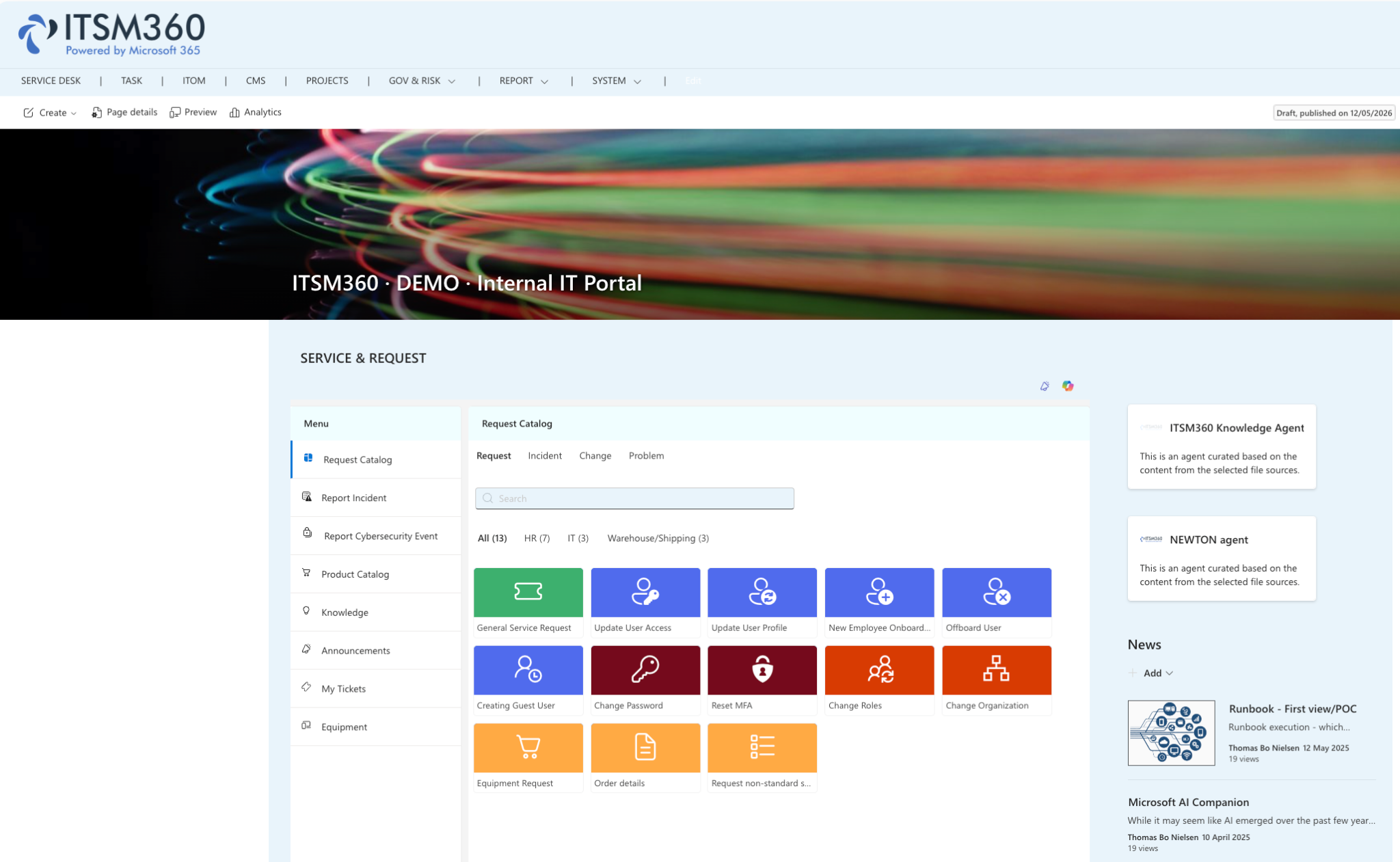
Service Management only works effectively when users don't have to search for where they need to go. That's why ITSM360 integrates with the applications employees already use every day.
Self-Service in SharePoint
By default, you can make the Self-Service Page available to your internal users via SharePoint, or securely offer it to your own clients via your website as a service desk solution.
Anyone with knowledge of Microsoft can maintain, improve, and further innovate this system on their own. In addition, you can create your own logo or page, or integrate it from a well-known intranet page.

Self-Service in Teams
ITSM360 integrates natively with Teams and, as a result, also with Teams features such as calling, notifications, chat, etc. Working within channels with the appropriate permissions and access is also standard.
In addition, this means that ITSM360 is also available on mobile devices, at no additional cost or maintenance.

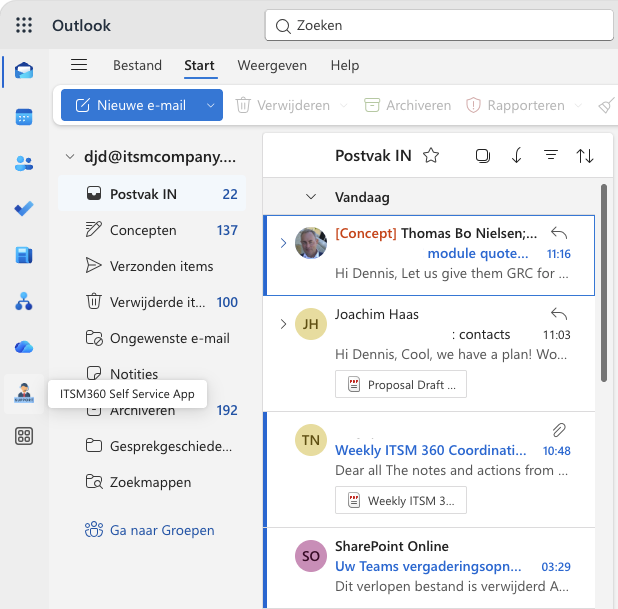
Access from Outlook
It's easy to install ITSM360 as an app in Microsoft Outlook, giving your users access to the most important applications from a single screen.
This means no more switching to other screens or logging in to other portals. This results in extremely high ratings, low adoption costs, and easy communication.
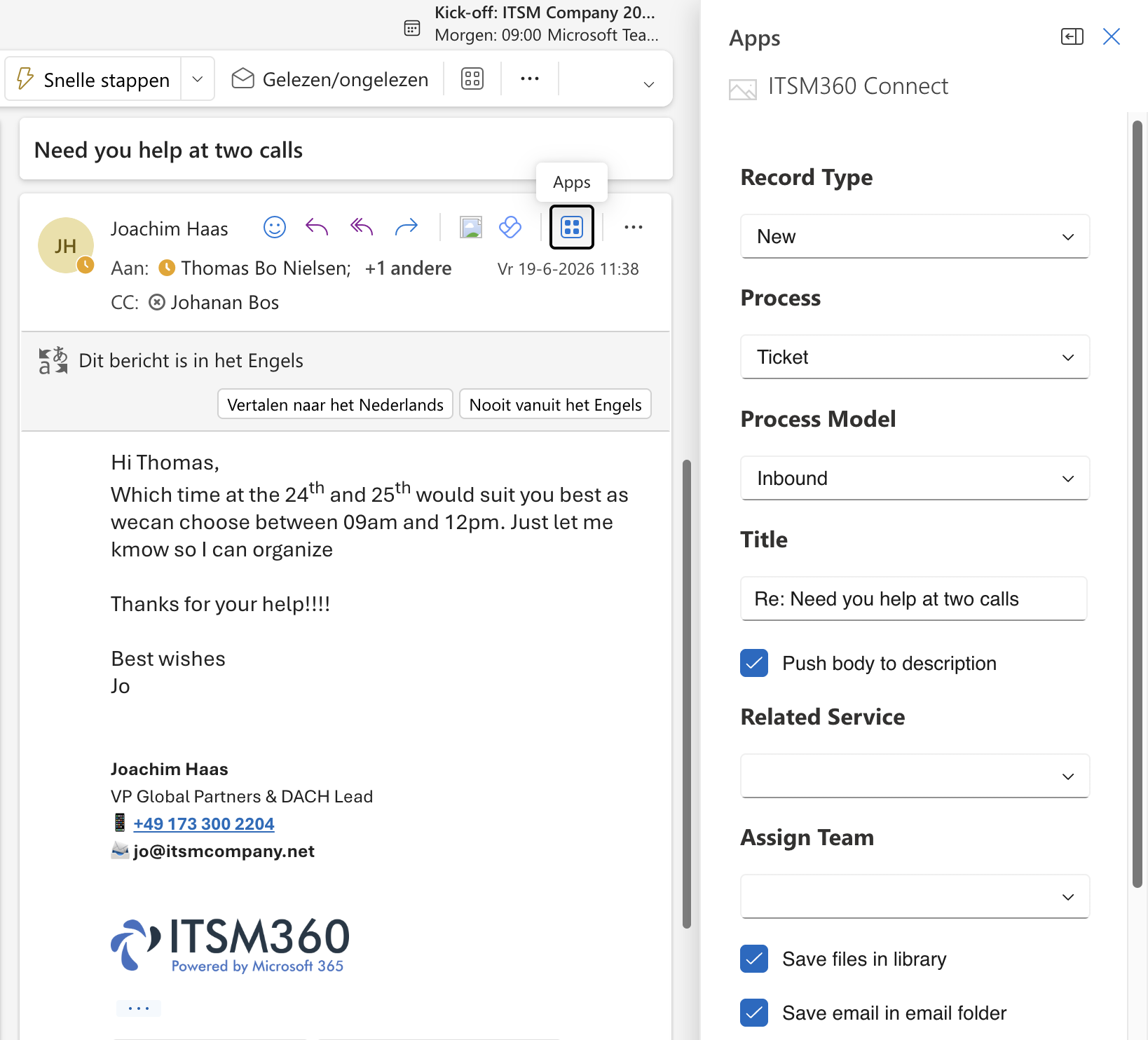
Email-to-Ticket
You often receive emails—for example, from your own clients—that need to be converted into a ticket for the department responsible for handling them. This could be IT, but it could also be HR, Finance, Customer Service, Legal, etc.
Using the ITSM360 Connect button for Outlook makes this quick and easy to set up. This is what truly sets ITSM360 apart as an ESM platform.
• ITSM360 · AI and Copilot in Service Management
AI supports both users and healthcare providers.
ITSM360 makes it possible to apply AI directly within the service context. Users receive assistance with self-service and knowledge-based inquiries, while agents can use AI for summaries, suggested solutions, and prioritization.
1. AI Happy Helper for End Users
Answers questions, helps with known issues, and provides self-service support directly within the portal.
2. Agent Assist for healthcare providers
Supports service agents with context, knowledge, suggested solutions, and relevant next steps.
3. Native language support
Tickets can be displayed in the reader's language, which is valuable for international shared service centers.
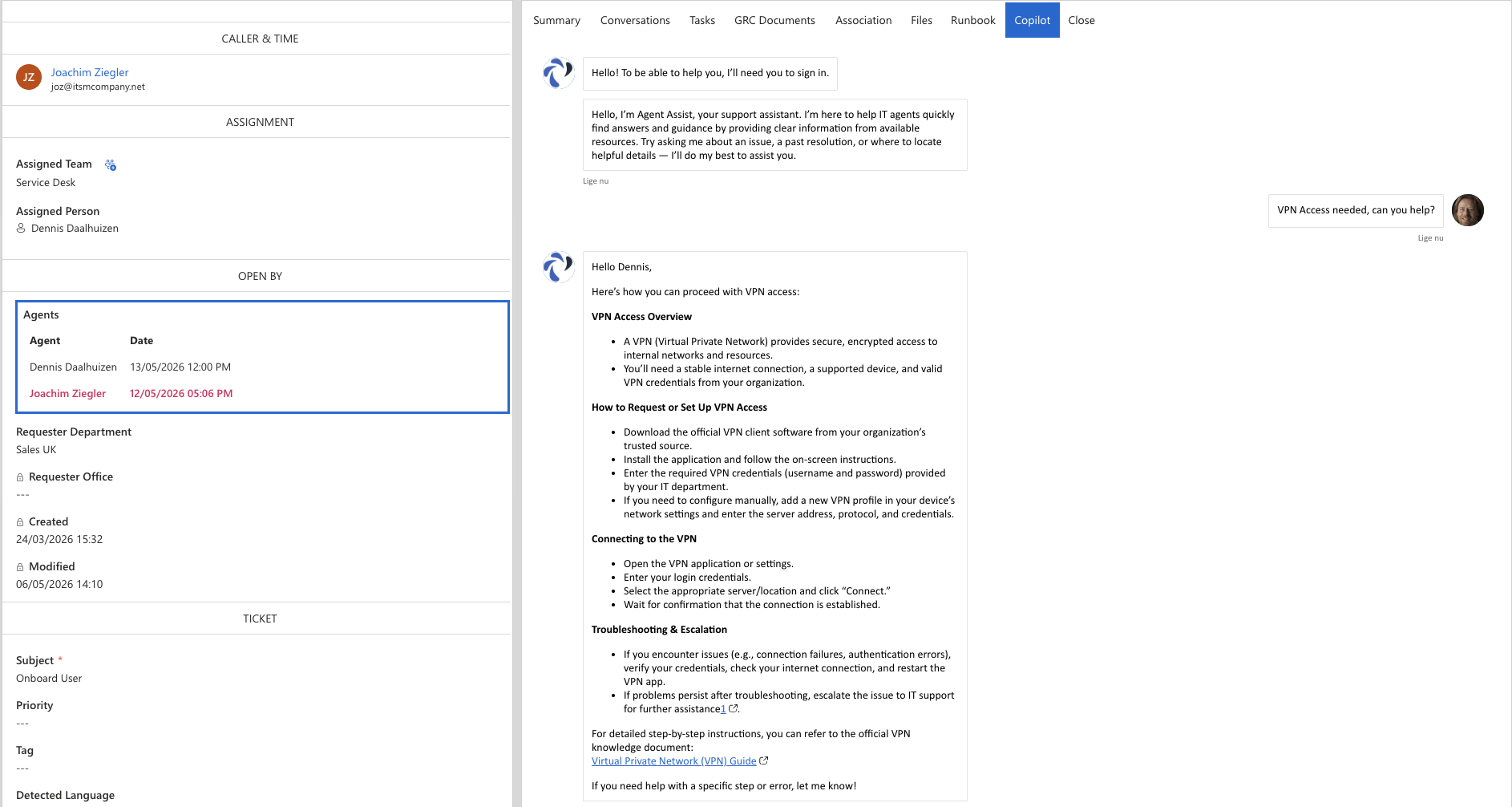
This gives Transitieprofs and ITSM360 a huge advantage: we can innovate directly with AI, in combination with, for example, automation (Microsoft Power Automate), integration (using APIs from your other applications), and reporting (Microsoft Power BI). To achieve this, we utilize our “AI Innovation Factory” and, together with you, can innovate more effectively, cost-efficiently, and quickly toward a “Native AI Service Platform.”
Previously designed combinations are standard features of our “Catalog,” such as a building block to automatically recognize a language, convert it to the handler’s preferred language, perform automatic management actions using “Approvals” in Teams, and finally close the report and respond to the reporter in the original language: it’s already been created, so it’s available to you too!
This catalog is growing at an incredibly fast rate, and reusing it requires only a few hours of effort and no expensive or complex modules.
From ITSM to Enterprise Service Management.
ITSM360 is not just an IT solution. The suite evolves into a broader Enterprise Service Management platform, enabling HR, Facilities, Finance, projects, compliance, and governance to operate within the same service operating model.
Ticket App
Your staff members who work in departments such as IT, Facilities, HR, Finance, or Legal can also use the ITSM360 App as their standard tool in SharePoint, Outlook, or Teams.
At no additional cost, which reduces training, adoption, and management expenses.

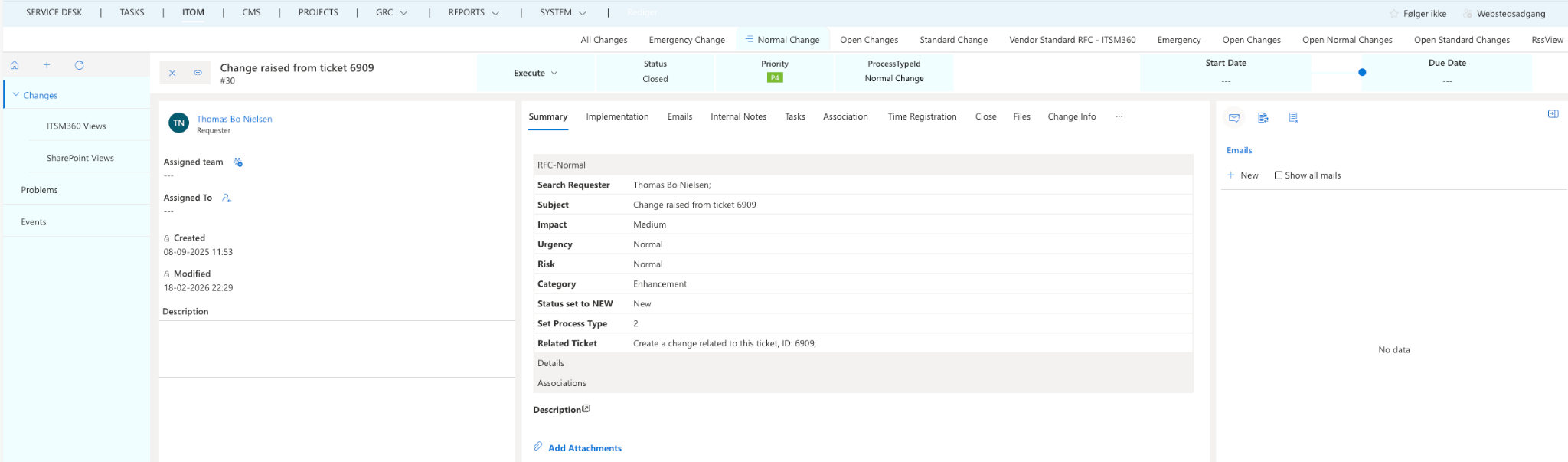
ITOM App
With the ITOM App (Change and Problems), you can automatically convert and manage your requests in accordance with the ITIL standard. Fully integrated with the other ITSM360 Apps, this ensures that you have access to all information, projects, assets, CIs, knowledge, and other data.
CMS and CMDB App
Configuration items, service relationships, stakeholders, and dependencies—all in one place.
As an example, this makes it possible to provide a user or practitioner with all relevant information while creating a report, to have tasks automatically generated and distributed, and to have the AI carry out the actions in a fully automated manner.
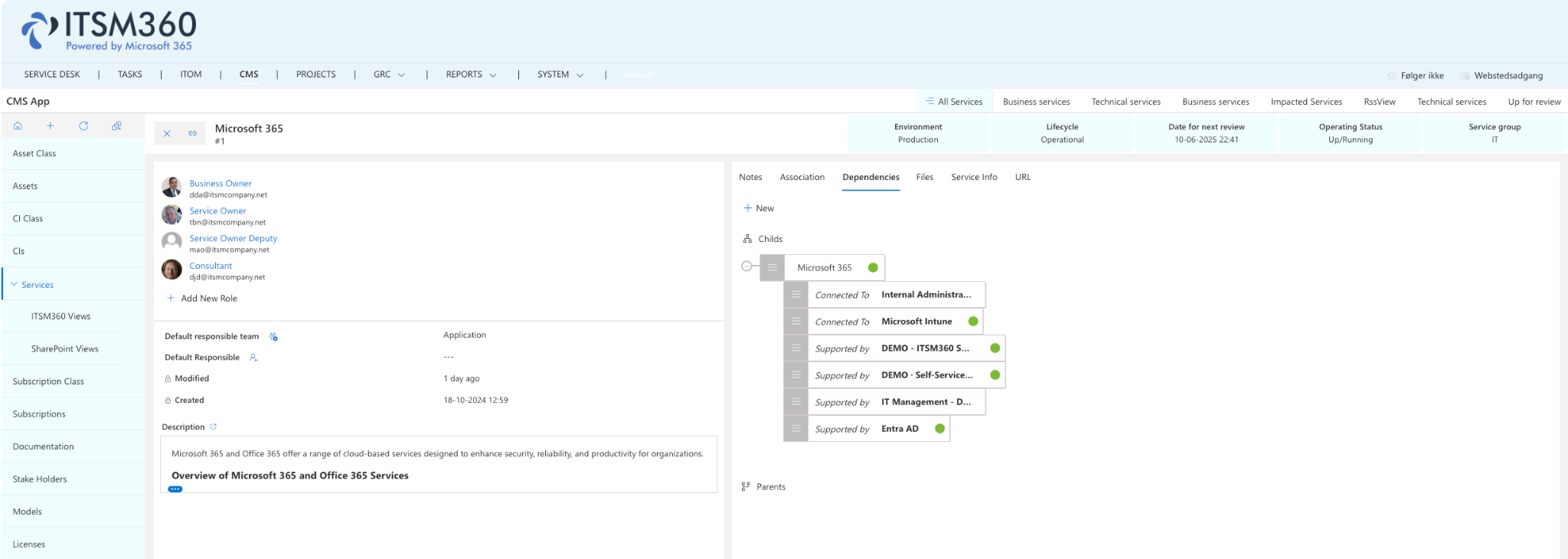
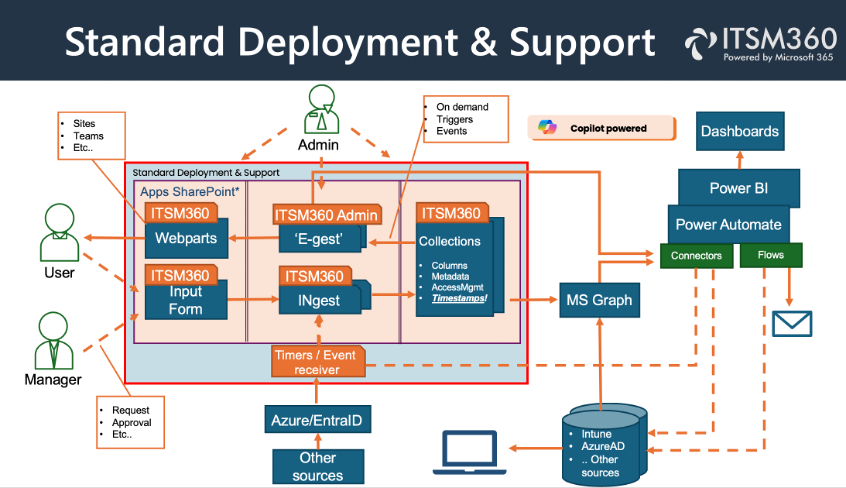
The CMS/CMDB App is truly “the heart” of the solution. This means you can establish connections between dependencies, link information from Microsoft Intune, associate information with services and make it available to various stakeholders, link automation flows, integrate management tools, integrate AI, and more.
Once again, it’s based on everything you already have, without the need to purchase any additional modules. This makes ITSM360 truly THE solution for the future, with a TCO that is 3 to more than 10 times lower than that of all other well-known solutions.
Project App
Projects, milestones, tasks, and improvement initiatives related to service operations
The Project App is also a standard feature, fully integrated with SharePoint, Teams, and the other ITSM360 apps.
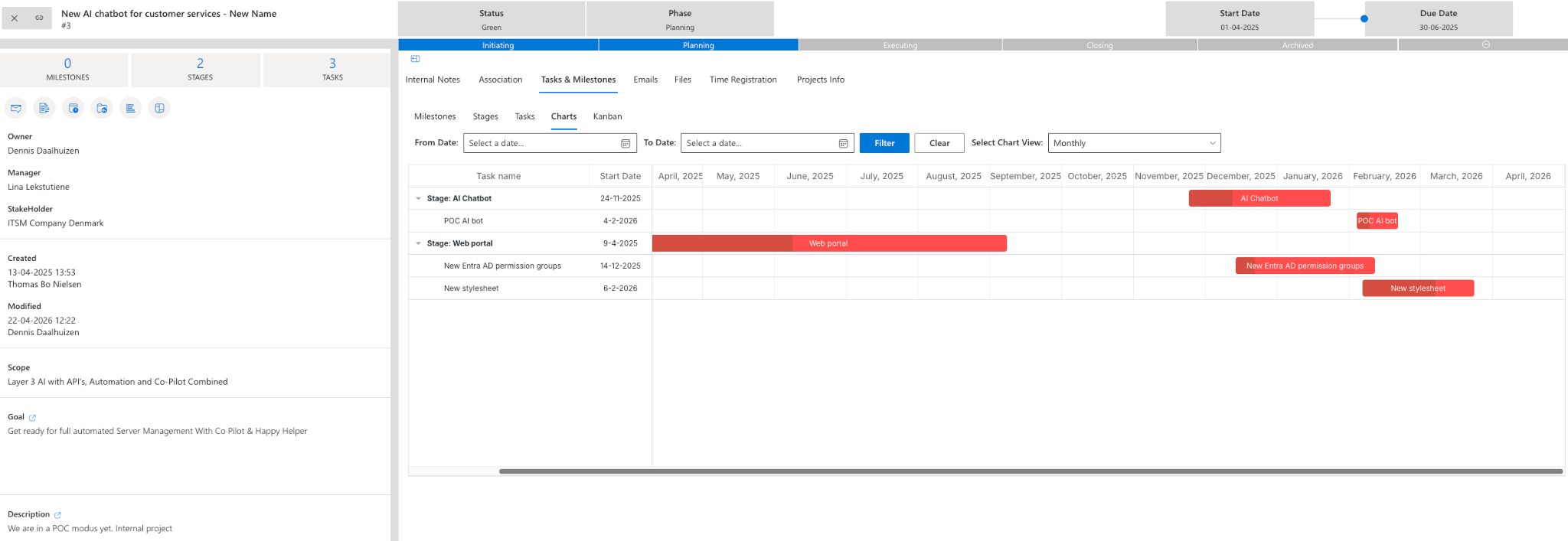
Working with tasks, Kanban boards, notifications, changes, CMDB items, communication, knowledge, etc., is therefore also integrated as a single solution by default: no more switching to other portals or applications, no more duplicate work!
• ITSM360 · Automation and CMDB
Data, processes, and automation—all connected.
With ITSM360, service processes can be linked to Power Automate flows, external data sources, MS Graph, and the CMDB. This creates a scalable foundation for automation, reporting, and governance.
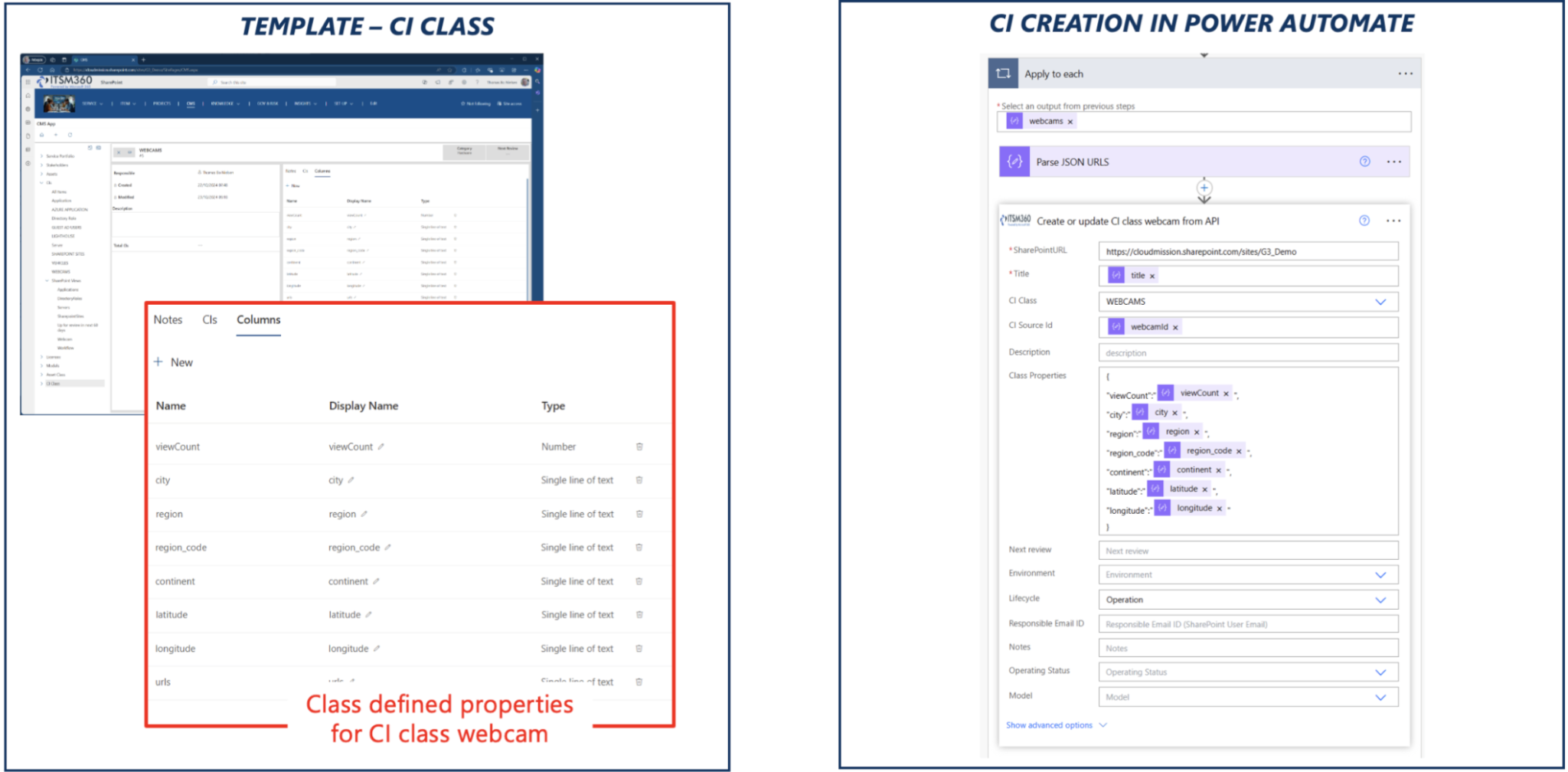
By integrating the CMS/CMDB app with Power Automate and APIs, it’s easy to, for example, have notifications generated automatically when a CI (webcam) fails and even have management tasks carried out entirely automatically.
This is true innovation, and this is exactly why we’re here: to make it happen together with you and our “Innovation Factory.” To this end, we organize “User Story Sessions” in which we work together to link processes and technology to all Microsoft solutions and other tools, using our extensive “Building Block Catalog,” which makes all User Stories previously created by us and other partners available, implements them, and manages them (either by you or by us).
Integrated governance, risk, and reporting.
Service Management is increasingly becoming an integral part of governance, compliance, and management reporting. ITSM360 supports this with GRC functionality and Power BI reports.
GRC360 App
Risks, compliance, data processes, documentation, and governance related to ITSM master data.
The GRC App is included as standard, but will always be implemented as a separate project, because these functionalities often involve complex requirements.
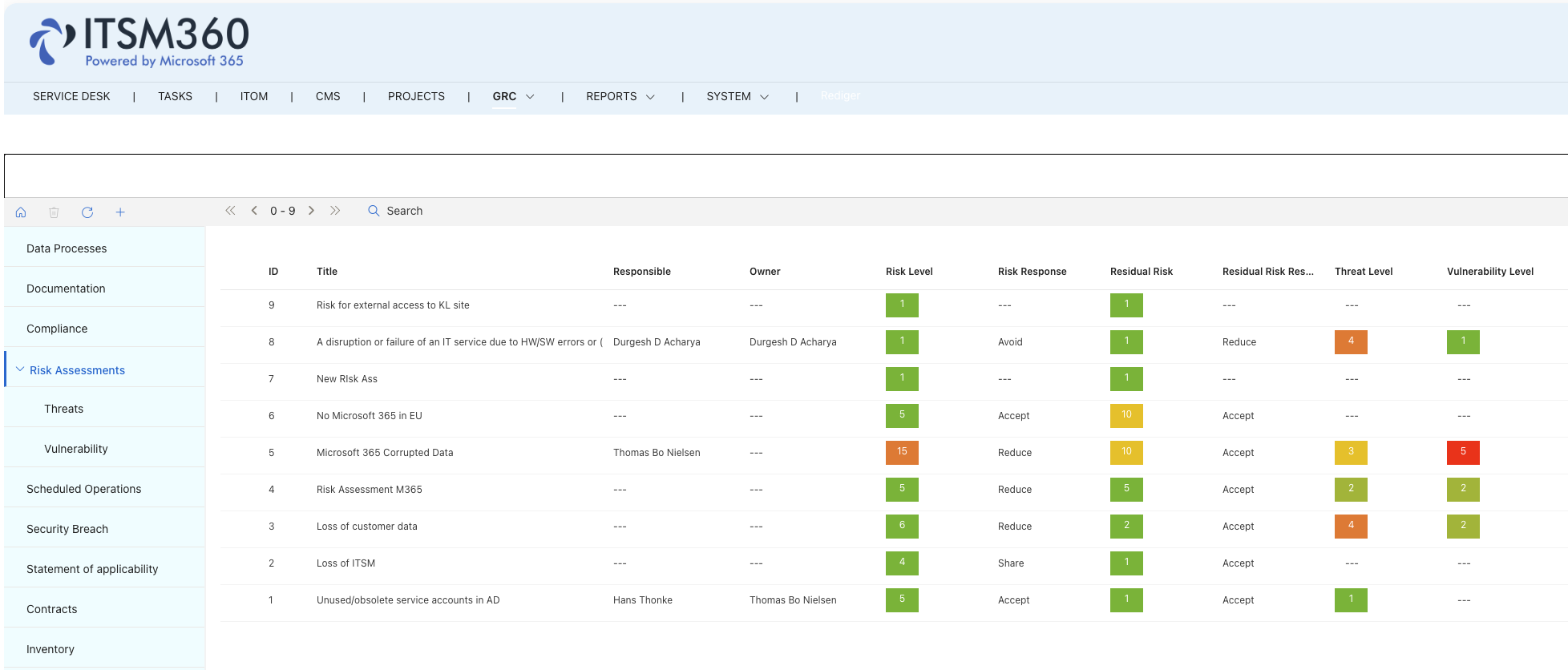
For example, some clients use Power Automate to “populate” the GRC App with selected information, then use AI and Power BI to convert this into a report, which is subsequently automatically “pushed” to the ISO audit organization—making it much simpler and more cost-effective to manage audits and certification. We’d like to work with you and our “Innovation Factory” to make this a reality. To this end, we organize “User Story Sessions” in which we work together to link the processes and technology to all Microsoft solutions and other tools, utilizing our extensive “Building Block Catalog,” which makes all User Stories previously created by us and other partners available, implements them, and manages them (either by you or by us).
Power BI Reporting
Real-time insight into app deployments, versions, changes, usage, and configuration.
Reporting is standard and straightforward, based on ITIL. However, if you have more specific requirements for customized reports, we offer our “Innovation Factory” and the accompanying Catalog.
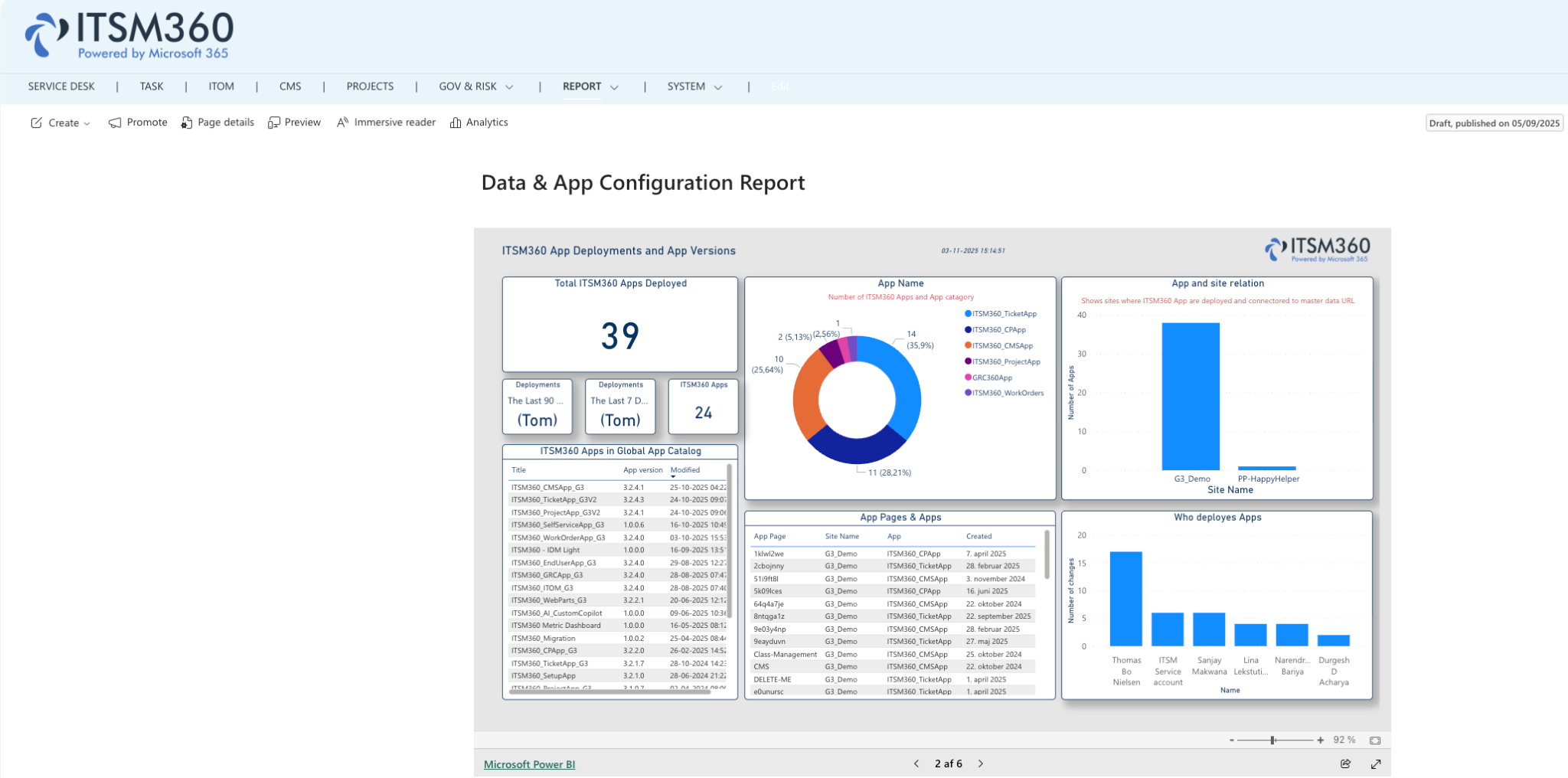
We offer you a wide range of reporting options to choose from, but it’s also possible, for example, to convert reports into “real-time” information—such as satisfaction ratings for services and processes—that are collected when tickets are closed. Once again, no extra modules or applications are needed—just reuse all your existing Microsoft solutions, such as Microsoft Fabric. Simple, secure, cost-effective, and ready for the future: an AI Native Service Platform that will set your organization apart!
Operational Management
ITSM360 makes it easy to customize your own screen and content. After all, someone from the Service Desk wants to see different information on their screen than, for example, someone from Facilities.
Throughout the project, we will work with your healthcare providers and departments to determine what information they would like to see.
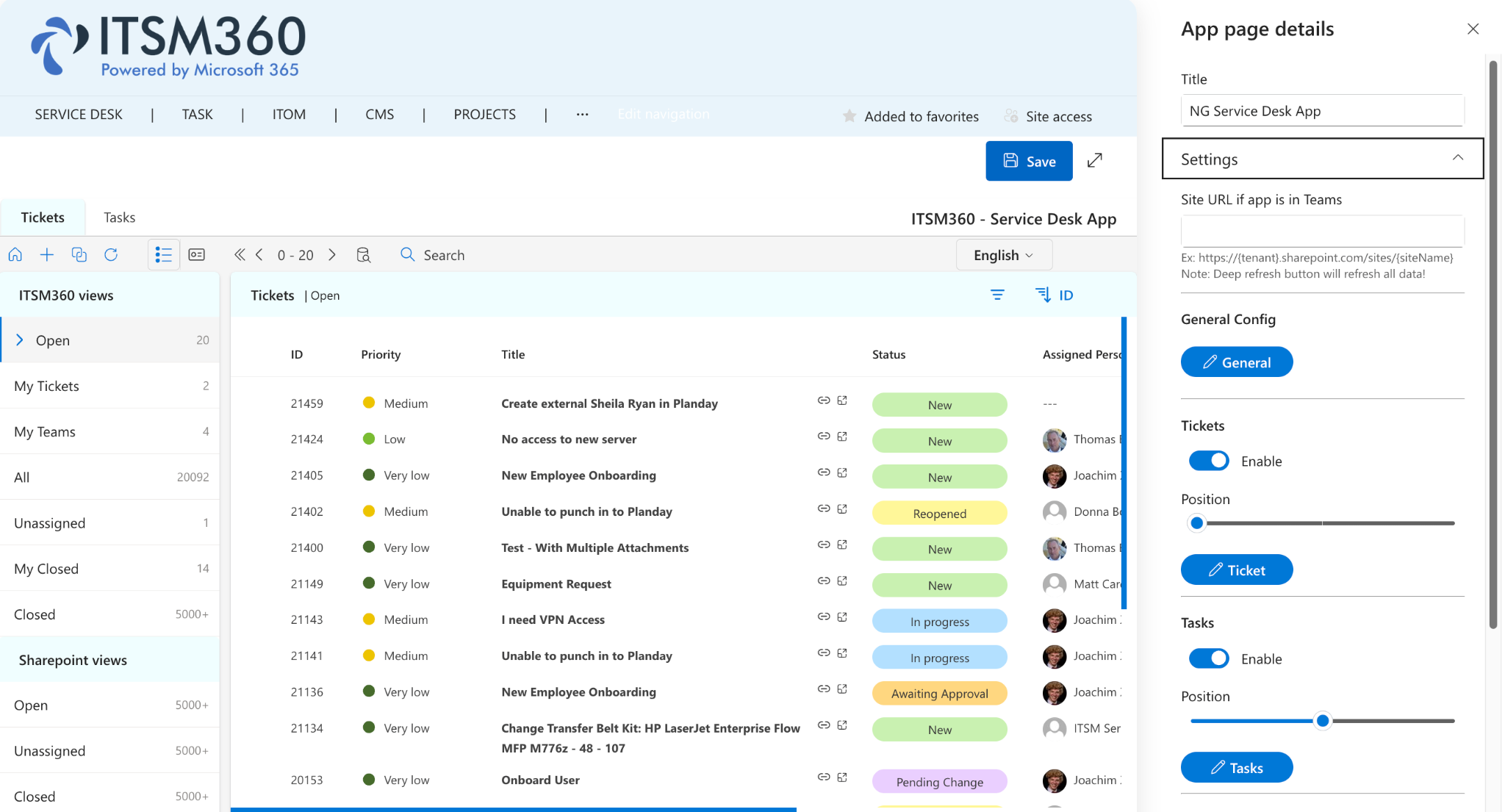
It is even possible to display information on the screen from a financial system, an HR system, etc.
We will integrate the required information once using APIs and automation and set it up for you.
This is what makes ITSM360 unique, simple, cost-effective, and a pleasure to work with: after all, anything you DON’T want to see is no longer visible as a “button or field.”
Transitieprofs is an Exclusive Premium Partner of ITSM360.
As an Exclusive Premium Partner of ITSM360, we combine in-depth platform knowledge with more than 30 years of experience in IT strategy, service management, process automation, and complex transitions.
Curious about what ITSM360 can do for your organization?
Schedule a demo or strategic exploration and discover how ITSM360 helps your organization bring together ITSM, ESM, AI, automation, and governance within Microsoft 365.
Ready for the next step in ITSM?
Discover how your organization can transition from traditional IT service management tools to a Microsoft-based enterprise service management platform that is ready for AI, automation, and secure scalability.
A clear path from ITSM to ESM.
Practical insights into Microsoft Fit, governance, and AI opportunities.
Advice on design, implementation, and operation.